uniCOS / uniBOX
For discontinued uniCOS products, click here.
Tabletop Unit:
- 71.98.2005 – uniCOS PRO T (formerly uniCOS T/MM10 Mike) – EN | FR | NL | DE | ES | IT
- 71.98.2015 – uniCOS CORE T – EN | FR | NL | DE | ES | IT
- (Available upon special request) 71.98.2003 – uniCOS T/MM10 – EN | FR | NL
Flushmount Units and Brackets:
- 71.98.2014 – uniCOS PRO F (formerly F/MM10 Mike) – EN | FR | NL | DE | ES | IT
- 71.98.2013 – uniCOS PRO F Bracket (formerly F/MM10 Bracket) – EN | FR | NL | DE | ES | IT
- (Available upon special request) 71.98.2001 – uniCOS F/MM10 – EN | FR
Modular Multimedia System:
- 71.98.2005 – uniCOS PRO T (formerly T/MM10 Mike) – pdf | dwg | jpg views | table cutout
- 71.98.2014 – uniCOS PRO F (formerly F/MM10 Mike) – pdf | dwg | jpg views
- 71.98.2003 – uniCOS T/MM10 – pdf | dwg | prt | rfa | table cutout
- 71.98.2001 – uniCOS F/MM10 – pdf | dwg | prt | rfa
- 71.98.2004 – uniBOX PRO – pdf | dwg | prt
- 71.98.0013 – uniCOS F/MM10 Bracket – pdf | dwg | prt
- (Webinar) uniCOS CORE and Family: Hybrid Meeting Excellence – View
- (Webinar) uniCOS as perfect all-in-one solution – View
- Master demo kit explainer (uniCOS PRO F / F-MM10, Plixus Nameplate)* – View
- How to Use Microsoft Teams with uniCOS – View
* Please note that since the video was recorded, the microphone connector and microphone type have changed. The new uniCOS PRO F / F-MM10 unit now has a push&lock microphone connector to fit the Mike microphones.
Full-width characters on uniCOS CORE have the following limitations:
Observed display behavior for below character sets:
- Half-width Katakana:
"テレビク"is displayed as"テ" - Full-width Katakana:
"テレビク"is displayed as"テ" - Half-width Latin script:
"Hello, world!"is displayed as"Hello" - Full-width Latin script:
"Hello, world"is displayed as"H" - Hiragana:
"ひらがな"is displayed as"ひ" - Kanji:
"漢字"is displayed as"漢" - Hangul: “한글” is displayed as “한”
- Greek: “Ελληνικά” is displayed as “Ελ”
Conclusions:
- In Latin script, up to 5 characters can be shown in half-width, only 1 in full width.
- In Greek, up to 2 characters can be shown.
- In most Asian scripts, only 1 character will be displayed.
- The first 5 bytes will be displayed.
- In the UTF-8 encoded Unicode code space, the classic ASCII characters take 1 byte to store, so 5 of these will fit.
- Greek characters take 2 bytes, so 2 of these will fit in the space of 5 bytes, with 1 byte to spare.
- It is also possible to combine multiple scripts, for example 2 Greek characters (2×2 bytes) and 1 Latin character (1 byte) for a total of 5 bytes.
This note applies to the following products:
- uniCOS PRO T (71.98.2005)
- uniCOS T/MM10 Mike (71.98.2005)
- uniCOS T/MM10 (71.98.2003)
- uniBOX PRO (71.98.2004)
It is possible to assign the interface of the uniCOS CORE to the uniCOS PRO and/or the uniBOX PRO with a screen.
Follow the steps below:
- Update your system. Please visit Televic’s software updates page here: https://www.televic.com/en/conference/support/software-updates/confero-for-plixus-software-updates.
- uniCOS PRO with uniCOS CORE interface: update to Confero version 7.16 or higher.
- uniBOX PRO with uniCOS CORE interface: update to Confero version 7.19 or higer.
- When your system is up-to-date, log in to Confero as a Technician.
- In the left-hand navigation menu, select Devices.
- Open the Device capabilities tab.
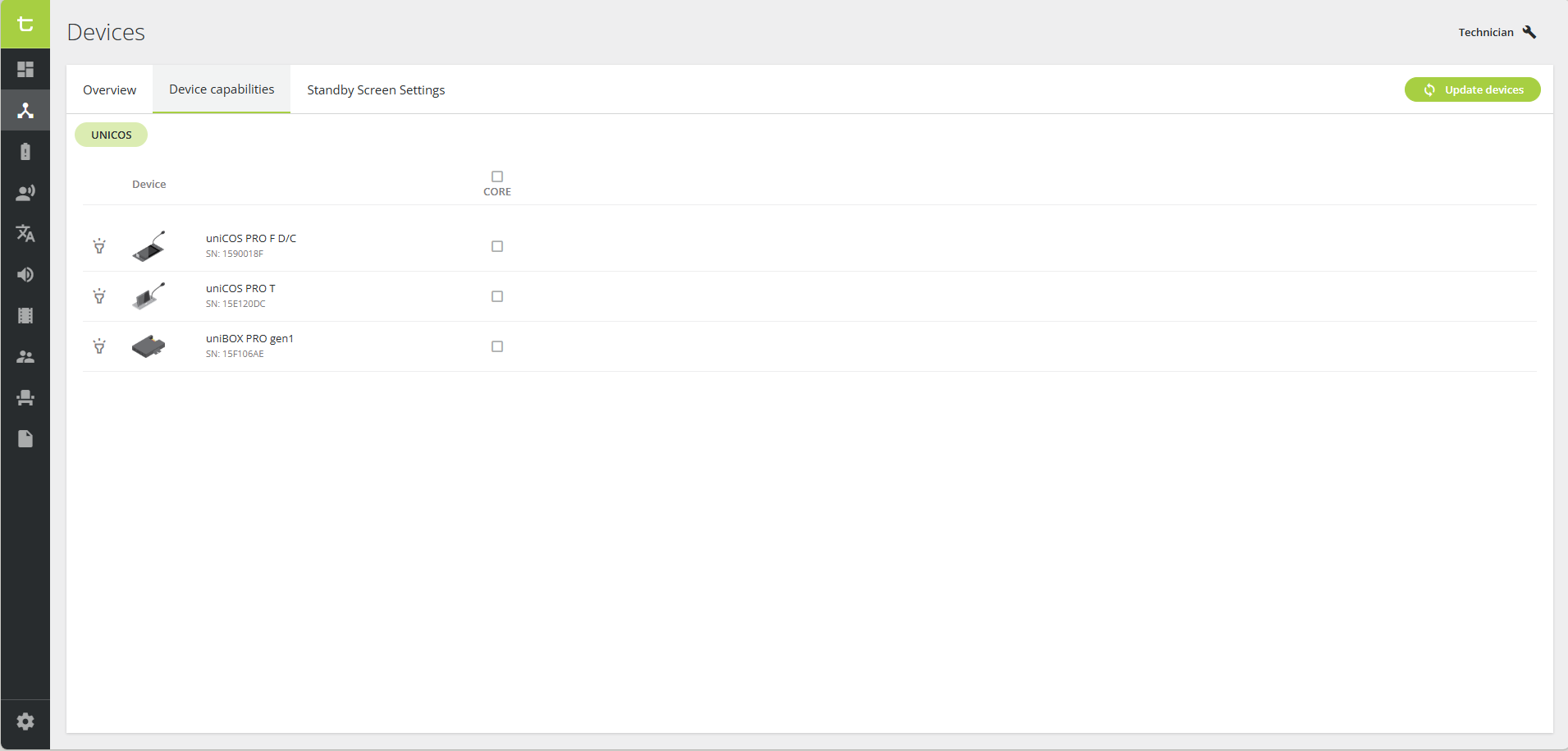
- To configure a specific unit, select (or unselect) the CORE checkbox of the desired uniCOS or uniBOX unit.
💡Click the flashlight icon next to a unit to make its microphone LED light up, helping you identify the correct device.
 - To configure all units at the same time, select (or unselect) the main CORE checkbox at the top of the column.
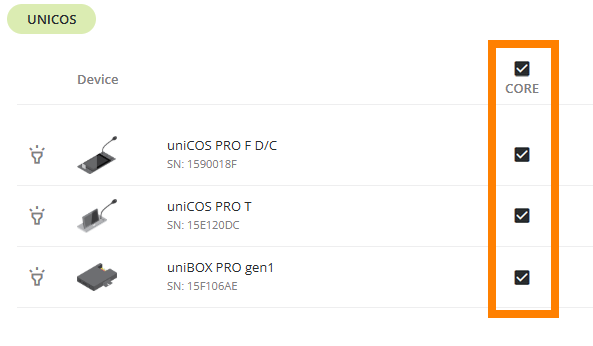
- The units are now configured with the desired interface.
 next to a unit to make its microphone LED light up, helping you identify the correct device.
ℹ️ For more information on the uniCOS PRO T and CORE T interfaces, please refer to the Plixus & Confidea G4 Units – User Guide.
Please note the following about uniCOS’ screen behavior:
- The screen doesn’t dim.
- The screen goes to sleep after 2 hours of inactivity. Note that if a uniCOS standby screen is set to a video stream, the device will still go to sleep after 2 hours.
- The screen cannot be controlled through API.
- Conditions for resetting the screen saver: touching the screen or any physical button.
The uniCOS interface supports the following languages:
Arabic, Belarusian, Chinese, Chinese (traditional), Croatian, Dutch, English, Farsi, Finnish, French, German, Hebrew, Hindi, Italian, Japanese, Korean, Latvian, Mongolian, Montenegrin, Polish, Portuguese, Russian, Serbian, Slovenian, Spanish, Thai, Turkish, Ukrainian, Vietnamese.
In case your preferred language is not in the list, you can contact Televic by clicking here.
You can upload a standby image/logo on the screen of the uniBOX PRO unit. The image requirements are as follows:
| Meeting Management Software | Format | Resolution |
|---|---|---|
| Confero | png, jpg, jpeg | 1920 x 1080 |
| CoCon Room Configurator | png, jpg, jpeg | 1920 x 1080 |
You can upload a standby image/logo on the screen of the uniCOS unit. The image requirements are as follows:
uniCOS F-MM7:
| Meeting Management Software | Format | Resolution |
|---|---|---|
| Confero | png, jpg, jpeg | 1024 x 600 |
| CoCon Room Configurator | png, jpg, jpeg | 1024 x 600 |
uniCOS PRO T (formerly T-MM10) and PRO F (formerly F-MM10):
| Meeting Management Software | Format | Resolution |
|---|---|---|
| Confero | png, jpg, jpeg | 1280 x 800 |
| CoCon Room Configurator | png, jpg, jpeg | 1280 x 800 |